

You’ve overhauled the spare room, invested in a desk, and assembled a workstation that would make a small IT department jealous.
There’s just one detail you forgot about: the room’s wiring was designed for a bedside lamp and an alarm clock, not a dual-monitor command centre.
Now, you’ve got a computer, a printer, a desk lamp, a phone charger, and a router all fighting for two sockets behind a chest of drawers. Ever since, you’ve been dealing with flickering lights and tripped breakers.
So, if your home office’s electrical system has been acting up lately, here’s what’s likely going wrong and how to sort it out.
Too Few Power Points
Most spare bedrooms in older UK homes were fitted with two or three sockets at best. That was perfectly reasonable when the room’s biggest electrical demand was a reading light and maybe a radio.
Fast forward to now, and you need enough power to run a full desk setup from a room that was never wired for one. To compensate for this, you might be using a tangle of extension leads and multi-plug adapters stacked on top of each other.
That arrangement might keep your setup running, but it puts more load on a single circuit than it was designed to handle.
If you’re constantly shuffling plugs just to charge your phone while the printer runs, that’s a sign you need additional sockets instead of another adapter from the bargain bin.
Tripping Circuits
If you’ve overloaded your sockets, the next thing you’ll notice is the circuit breaker tripping. You switch on the printer while both monitors are running, and suddenly everything goes dark.
This usually means your devices are pulling more current than the circuit can safely carry. But an overloaded circuit isn’t the only reason a breaker might trip. A faulty appliance or a dodgy connection somewhere in the wiring can cause the same problem.
Either way, resetting the breaker and carrying on isn’t a solution. If it keeps happening, there’s a bigger problem you need to look into, ideally before you lose an afternoon’s work to a sudden blackout.
Warm or Discoloured Sockets
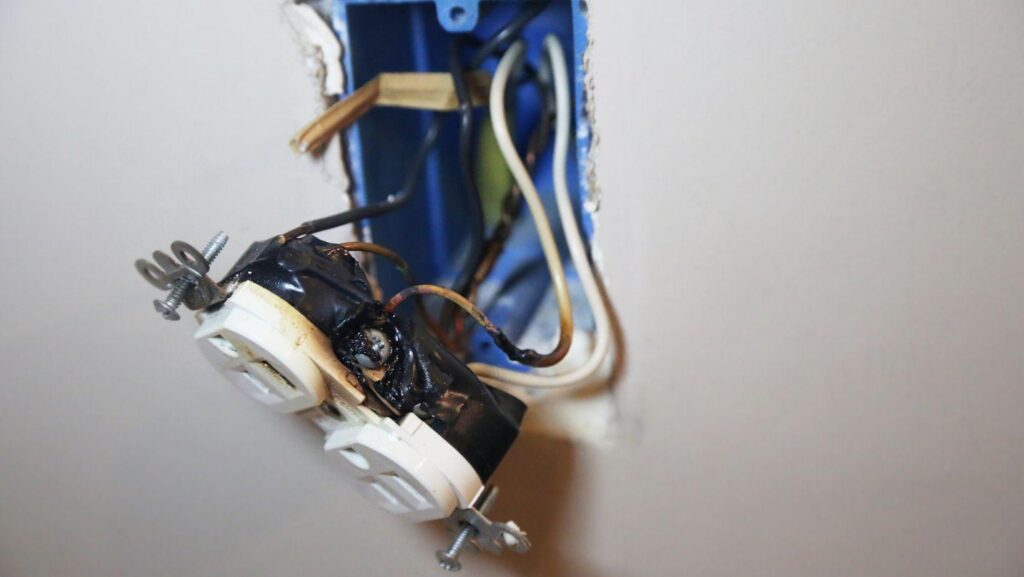
Run your hand over the sockets near your desk at the end of the day. If any of them feel noticeably warm, or if you spot scorch marks, browning, or discolouration around the edges, that’s not normal wear and tear.
Warm sockets usually mean the internal connections are loose or corroded, and the heat that builds up can damage the wiring further. In the worst-case scenario, it can start a fire behind your furniture.
Don’t cover up the socket with a new faceplate and hope for the best. To stay safe, switch off the socket, unplug everything, and get a qualified electrician to inspect it as soon as possible.
Flickering Lights
A brief flicker when you switch on a heavy-duty laser printer is usually not a cause for concern. But what if the overhead light dims every time you jump on a Zoom call? That’s a sign your electrical system is struggling.
Loose connections, worn-out fittings, and voltage fluctuations can all cause flickering, and some of those faults sit behind the walls where you can’t see them.
So, don’t brush it off as a dying bulb if swapping it out doesn’t fix the problem. Persistent flickering usually points to wiring issues that you’ll want to catch before they turn into a full blackout mid-presentation.
Faulty Extension Leads
If your home office doesn’t have enough sockets, extension leads can end up running most of your equipment. And that’s understandable when your desk sits two metres from the nearest wall socket. That said, they were built as temporary fixes, not permanent ones.
Over time, cheap extension leads can overheat, especially if you plug in a monitor, a charger, and a desk lamp all at once. Also, daisy-chaining multiple leads together, which is surprisingly common, increases the risk of overheating and electrical faults.
Check your leads regularly for cracked casings, exposed wires, or a plug that feels warm after a full day’s use. If anything looks damaged, replace it right away.
Spending £20 on a heavy-duty, surge-protected strip is a lot cheaper than replacing a fried motherboard.
Cable Damage
Your desk setup probably has cables running behind furniture, looping around chair legs, or trailing across the floor where they get rolled over every time you push your chair back.
That kind of daily wear slowly crushes and frays the insulation. Once the protective layer cracks, you’ll be left with exposed wiring that creates both an electrical and a trip hazard.
Take a few minutes to tidy things up. Cable clips and trunking keep wires off the floor and away from chair castors, and they cost next to nothing at any hardware shop.
And if any cable already shows cracks, kinks, or visible copper, replace it immediately instead of wrapping it in tape and hoping it holds.
Unexplained Power Loss
You’re halfway through an important meeting when a device suddenly cuts out. Your monitor goes dark mid-sentence, the router drops, or your laptop stops charging. Before you call tech support, try plugging something else into the same socket.
Intermittent power loss often points to a loose connection in the socket itself or further back in the circuit. Try a few other sockets around the room while you’re at it, because if they share the same circuit, the fault could be affecting more of your setup than you realise.
If you need an electrician, Clapham has no shortage of qualified ones who understand Victorian-era wiring and know exactly where to look without tearing the whole room apart.
Conclusion
Nobody wants to lose a morning’s work to an overheating socket or spend 10 minutes resetting the circuit breaker before their first meeting. Fortunately, most of these problems take less than an afternoon to fix.
So, get your setup checked today. You’ll finally be able to focus on work instead of wondering which socket is going to give out next.